
Overview
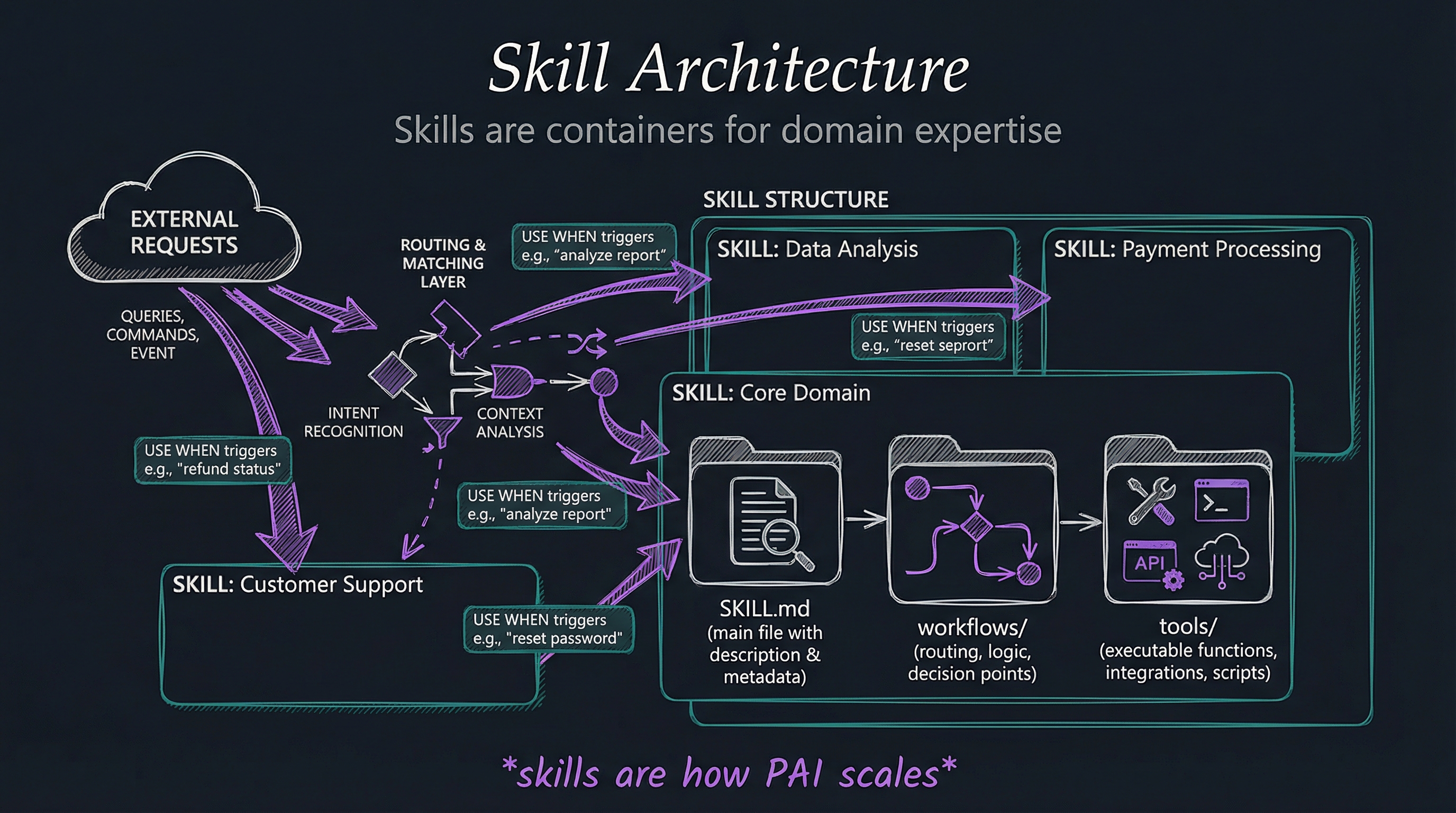
Skills are the organizational unit for all domain expertise. Skills are how LifeOS scales—each new domain gets its own skill, maintaining organization as the system grows.
“Skills are how you transform Claude Code.” They’re not just features or plugins—they’re self-contained packages of expertise, workflows, tools, and documentation that extend your AI’s capabilities in specific domains.
Each skill is a complete container: routing files that tell AI when to activate, workflows that define how to operate, context that provides domain knowledge, and tools that do the actual work.
Why This Matters
Organization prevents chaos - Without skills, everything is a monolith. With skills, capabilities are isolated, documented, and manageable.
Skills are shareable - Package your expertise and share it. Install others’ skills. Skills become the unit of community contribution.
Skills are testable - Self-contained skills can be tested in isolation. Monoliths can’t.
Skills are replaceable - Better skill appears? Swap it in. Skills have clean boundaries.
Skills compound - 50 skills create thousands of possible workflows through composition.
Implementation
LifeOS’s skill system is defined in .claude/Skills/CORE/SkillSystem.md—the canonical guide for skill structure.
Skill Directory Structure:
Skills/
├── SkillName/
│   ├── SKILL.md           # Routing + documentation
│   ├── workflows/         # Executable workflows
│   ├── context/          # Domain knowledge
│   ├── tools/            # CLI tools and scripts
│   ├── patterns/         # Reusable patterns (if applicable)
│   └── examples/         # Usage examples
Each skill contains:
1. SKILL.md - The Router
- Problem statement: What does this solve?
- Solution description: How does it work?
- Workflows: What can you do with it?
- Activation patterns: When should AI use this?
2. Workflows - The Actions
- Executable procedures for common tasks
- Compose tools and patterns
- Can invoke other skills
- Text in, text out
3. Context - The Knowledge
- Domain expertise and background
- Best practices and patterns
- Examples and anti-patterns
- Links to resources
4. Tools - The Executables
- TypeScript libraries
- Bash scripts
- CLI interfaces
- MCP server definitions
Examples
Example 1: Research Skill
- Problem: Need comprehensive multi-source research
- Solution: 10 specialized workflows for different research types
- Workflows: deep-dive, quick-research, OSINT, source-verification
- Context: Research methodology, bias detection, source evaluation
- Tools: Web scraping, content extraction, source attribution
Example 2: BrightData Skill
- Problem: Websites block simple scraping
- Solution: Progressive 4-tier scraping with automatic fallback
- Workflows: Tier selection, automatic retry, anti-bot bypass
- Context: Web scraping best practices, legal considerations
- Tools: WebFetch, cURL, Playwright, Bright Data MCP
Example 3: Fabric Skill
- Problem: Need AI patterns for content analysis
- Solution: 248 native patterns running in Claude’s context
- Workflows: extract_wisdom, summarize, threat_model, etc.
- Context: Fabric pattern library, usage guidelines
- Tools: Pattern execution, pattern updates, YouTube transcript integration
Example 4: Art Skill
- Problem: Need technical diagrams and visual content
- Solution: Automated diagram generation with optimization
- Workflows: generate-diagram, optimize-image, create-social-post
- Context: Visual design principles, technical diagramming
- Tools: Mermaid, diagram-to-image conversion, image optimization
Related Principles
- Principle #6: UNIX Philosophy - Skills do one thing well
- Principle #2: Scaffolding > Model - Skills are the scaffolding
- Principle #10: Meta / Self-Update System - Skills are what get updated